644 changes shipped on 83 different days between 1 June and 15 September. Rather than 68 release notes, they are on one page, grouped by the 6 jobs your team can hand over. The 3 biggest:
Eva in Slack and Microsoft Teams, and coming to Claude and ChatGPT through MCP.
Credit limits per person, weekly or monthly, and the cost of a run before you start it.
Duplicates matched across domain endings, ready to auto-merge, and synced back to your CRM.
Self-serve credit top-ups are live. Pick a package, pay with Stripe, and see credits in your workspace in about a minute. Three things shipped together:
Two entry points: the credit chip header popover ("Buy more credits") and the out-of-credits banner ("Top-up" link). Both lead to the same Stripe-powered checkout.
Six fixed packages from 1,000 to 50,000 credits in EUR, USD, or GBP. Bigger packages cost less per credit.
Top-ups stack on your plan: plan credits are used first, and top-ups expire in line with your plan cycle.
Three changes to how you clean up records in Evergrowth. Bulk operations now span Evergrowth and your CRM in one click.
Bulk delete across Evergrowth and every connected CRM: select any number of accounts or contacts, open Other actions, click Delete. The deletion runs across Evergrowth and your connected CRM at the same time.
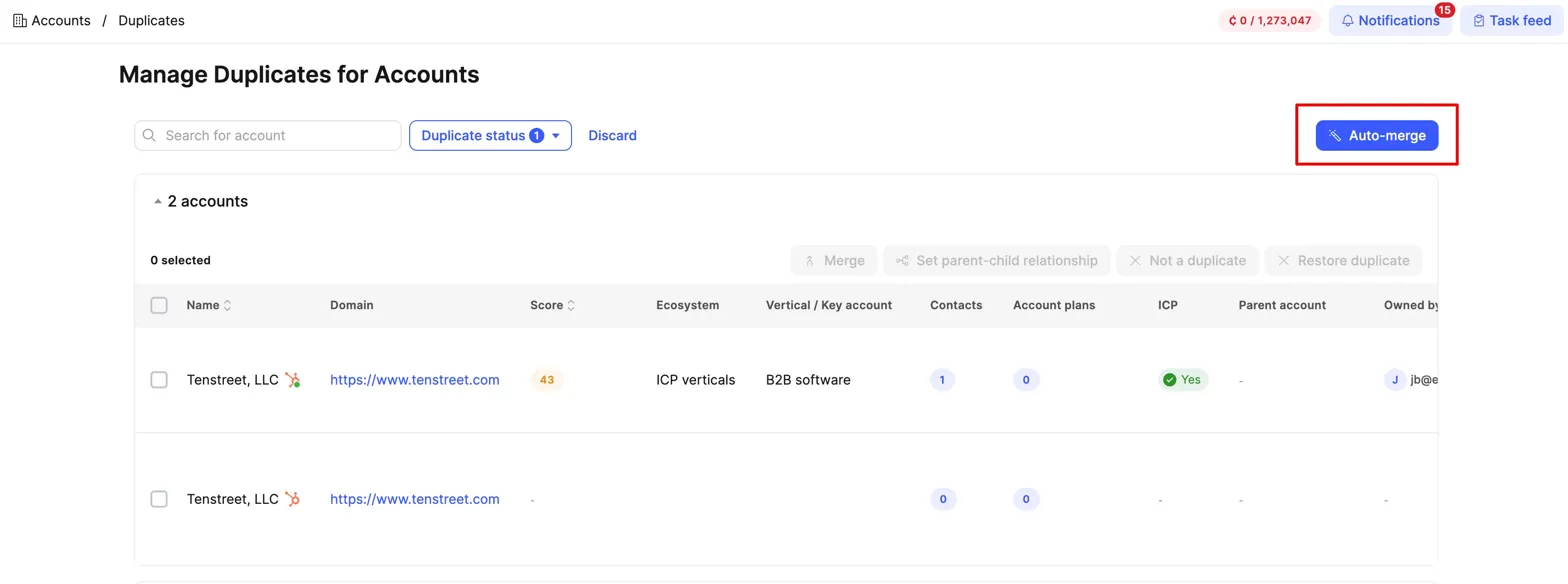
Auto-merge every duplicate account group in one click: the new Auto-merge button on the duplicates view scans every active group and merges each into a single primary in the background. You set the rule order (latest qualification, most contacts, highest score, latest research, CRM-connected, ICP yes) by drag and drop.
One-step contact and account merge: the contact-merge dialog now has an Also merge their accounts toggle, so the orphan-account problem is handled in the same step. The contact duplicates view also picked up an Account website column to spot mismatched-domain duplicates before you merge.
Deletions and merges cannot be undone, so the modals walk through scope and rule order every time before you start. Track running jobs at /feed/deletions and /feed/merges.
Best frontier model by default for research and qualification agents
New FeatureImprovementAgentsPricing
Three changes to how Account Qualification, Account Research, and Contact Research agents run. You now get the best frontier model for each task, at the best price, by default.
Model picked for you: The model dropdown is gone on these three agents. Pick Low, Medium, or High effort, and we route each run to the strongest frontier model available at the best price. When better models ship, your agents inherit them automatically.
New Speed control: Every run can now be set to Standard or Fast. Fast doubles the credit cost for priority processing when timing is the task.
Low effort now 0.5 credit: Moved from 0.3 to 0.5 to reflect the frontier reasoning model now powering Low. Still the cheapest way to run any agent.
You don't need to do anything. We already migrated your existing agents. 95%+ will run on Low effort and deliver better results, faster, than before.
Same framework rolling across the rest of the agent types over the coming weeks, starting with Contact Qualification and Play Agents.
Every potential duplicate account and contact in your workspace now lands in a single dashboard. Merge them, set parent-child relationships, or dismiss the ones that aren't really duplicates. The cleanup syncs straight to your CRM.
One dashboard, two objects: the same grouped view and three actions (Merge, Set parent-child, Not a duplicate) for both accounts and contacts. Accounts grouped by normalized domain; contacts matched by LinkedIn URL, email, or first+last name within the same account.
Merging that syncs to your CRM: works with HubSpot, Salesforce, Pipedrive, Zoho, and Dynamics. Merge multiple records at once, where most CRMs only allow two at a time. For Attio, our team is currently working on a workaround to make the same one-step cleanup work despite Attio's API limitations.
Pending detection at every entry point: Chrome Extension, Contact Finder Agent, CSV imports, and single contact creation now check for potential duplicates before records land in the workspace.
When we turned this on, 148K duplicate accounts and 128K duplicate contacts surfaced across customer workspaces on day one.
TitanX phone intent now built into your phone waterfall
New FeatureIntegrationsAgents
When your phone waterfall finds a number, TitanX can now verify it's valid and score how likely the person is to actually pick up. The result flows straight into your CRM and dialer. No more export-import shuffles between three tools.
Phone numbers verified and scored automatically: Every phone the waterfall finds can be handed to TitanX for verification and intent scoring. You get back four data points per number: validity, phone type (mobile, landline, VoIP), phone intent score (P1, P2, P3), and the verification provider.
Two scoring models per workflow: Inside the "Search for phone number" step, pick Lightning Scoring or Titan Scoring. Test both before scaling.
Scores flow into every surface: Filter your prospecting view by TitanX phone intent. Export the four fields. CSV imports map automatically using TitanX field names. Push scores directly into HubSpot, Salesforce, Pipedrive, Zoho, or your CRM of choice so dialer routing rules can use them the same day.
This is opt-in by workflow, so existing setups aren't affected. The integration uses your own TitanX subscription. Don't have TitanX yet? Evergrowth customers can access a preferred partnership rate through our direct deal with the TitanX team.
Contacts now store persona IDs, enabling detection of deleted personas. Users can filter affected contacts and see only related agents when launching contact research.
March 2026
CRM Sync Status Tracking per Record
New FeatureIntegrations
Every record now shows a colored sync status dot next to each CRM logo (green/orange/red/gray). Includes resync buttons, bulk resync, 43 human-readable reason codes, and field-level verification that detects when a sent value wasn't saved in the CRM.
Advanced Date Filters & Account LinkedIn Editing
ImprovementWorkspace
Date filters now support "newer/older than X days" plus "today" and "yesterday" operations. Account cards support editing LinkedIn URLs directly.
Account Planning Agent Templates
New FeatureAgents
Pre-built templates for the Account Planning agent. One global template available to everyone; admins can add more.
Domain Finder Agent & Accounts Without Domain
New FeatureAgents
Dedicated Domain Finder agent with reasoning output and two effort levels. Workflow Builder supports Domain Finder as a first step. Accounts can now be created without a domain.
Faster Contact Finder
ImprovementAgents
Contact Finder now starts searching for the next contact immediately after a valid match, with DISC and Play generation running in background. 33-46% faster for large companies.
CRM Phone Normalization & Contact Finder Dedupe
ImprovementIntegrationsAgents
Phone numbers normalized during CRM sync. Contact Finder checks emails against all existing contacts across the entire company scope to prevent duplicates.
CRM Record Links & CSV Import Enhancements
New FeatureIntegrations
CRM record links visible on profiles across all integrations. Email and phone accepted in contact CSV imports with provider tracking.
Account Deduplication Rules & Import Modes
ImprovementWorkspace
Updated deduplication to name + domain matching. Users can select deduplication behavior during imports: skip or update all matching accounts.
CRM Outbound Filters for Leads & Credits Visibility
New FeatureIntegrationsWorkspace
CRM outbound filters now support Leads. Credits usage always visible in the platform.
Custom Column Management for Datahub Tables
New FeatureWorkspace
Full column management for accounts and contacts: select, reorder, and save column configurations. Now includes qualification outputs, research outputs, and custom fields.
Saved Views via Link & Advanced Contact Filters on Accounts
New FeatureWorkspace
Saved views generate shareable URLs. Accounts filterable by contact fields with numeric operators and AND/OR grouping.
Inbound CRM Leads & Internal Deduplication
New FeatureIntegrations
Salesforce inbound leads sync with dedicated deduplication logic. Internal deduplication enforced for all internal processes.
Usage Dashboard & Credits Monitoring
New FeatureWorkspace
Usage dashboard (v0.1) for admin users showing key platform usage metrics with 24-hour refresh.
Account Planning Agent: Expanded Context
ImprovementAgents
Account Planning agent now accesses qualification output, account custom fields, and full contact data. Uses tool-based context extraction for relevant information only.
February 2026
Workflow Scheduler: True Concurrency
ImprovementAgents
Running workflows for 50 accounts is now as fast as 1. Improved heartbeat support eliminates 2-hour stalls during deployments. Configurable concurrency per company.
Datahub Ecosystem & Vertical ID Tracking
ImprovementWorkspace
Accounts store ecosystem and vertical IDs. Renamed or deleted verticals correctly reflected. Accounts with missing agents flagged for re-qualification.
CRM Auto-Mapping
New FeatureIntegrations
Map CRM fields once. Evergrowth handles the rest. Auto-mapping for Account, Contact, and Lead objects.
Contact Finder v1.9 & Dashboard Favorites
ImprovementAgentsWorkspace
Contact Finder upgraded with better Google search, third-party database validation, faster speed, and lower cost. Favorite saved views now available per user.
Research Agent Numeric Filters
New FeatureWorkspace
Research agent advanced filter now supports numeric operators (equals, greater, less, etc.) alongside text operators.
LinkedIn-Only Contact Import
New FeatureWorkspace
CSV imports now accept files with only LinkedIn URLs. System automatically enriches, creates accounts and contacts. Hybrid mode supports mixed rows.
User Feedback on AI Outputs
New FeatureWorkspace
Rate AI results with thumbs up/down and comments across 12 output types including qualification, research, plays, and ICP/IBP scores.
Contact Finder Rework & PDF Handling & Bulk Invites
ImprovementAgentsWorkspace
Contact Finder reworked for better accuracy. Large PDFs (100+ pages) now process in under 1 minute. Team member bulk invitations for onboarding at scale.
CRM Mirroring & Deduplication Toggle
New FeatureIntegrations
Deduplication toggle per company. CRM mirroring mode allows all domain variations. CSV import supports Create and Update modes separately.
Qualification and Research agents can now click/expand elements on websites and handle pages requiring initial loading.
Gemini 3 Pro & Flash Models
New FeatureAgents
Gemini 3 models available for agent selection. Account Research and Qualification switched to Gemini with custom tools. Contact Finder runs on Gemini 3 Flash.
Auto-Include Toggle & Platform Improvements
ImprovementWorkspaceIntegrations
"Auto-include all" toggle for plays and workflows. Ampersand integration fully removed. Contact filter by location. CSV import history with status tracking. Right-click to open records in new tabs.
January 2026
Unified CRM Owner Filter
ImprovementIntegrations
Single CRM owner filter groups users by integration type, replacing separate per-CRM filters.
Record Source Tracking
New FeatureWorkspace
Every record displays its origin source (Manual, CRM, Contact Finder, Chrome Extension, Account Data Finder). Filterable.
Gemini 2.5 Pro and Flash work with all custom tools. Bulk tag management and contact-by-account-tag filtering. Research agents easier to assign to verticals.
Contact Research Agent Filters & Saved Views
New FeatureWorkspace
Contacts filterable by research agent data. Account-level contact views support saved views and advanced filters.
Contact Research Agent
New FeatureAgents
Research agents now work for contacts. Configure per persona card, run on selected contacts or via workflows.
CRM v2: Outbound Filters, Custom Data & Multi-CRM
New FeatureIntegrations
Advanced outbound filters, bidirectional custom data mapping, multi-integration support, improved logs with Slack alerts. Filtering contacts by account data now available.
Global Custom Fields
New FeatureWorkspace
Custom fields for accounts and contacts. Configure in Settings, auto-detected in CSV imports, filterable in advanced filters.
Login auth moved to direct API calls, fixing 2FA issues. Customer health dashboard available internally.
Large-Scale Export Improvements
ImprovementWorkspace
Exports handle 53K+ accounts. ~100K records export in ~3 minutes. Field selector opens instantly.
Advanced Filters, Saved Views & Bulk Selection
New FeatureWorkspace
A three-part release transforming how you work with accounts and contacts:
Part 1: Advanced Filtering Mode. Switch to "Advanced" mode within Accounts and Contacts to use And/Or logic, multiple operators (greater than, exists/does not exist), and filter by any data point including research values.
Part 2: Saved Views. Save any configured filter as a named view you can instantly reload.
Part 3: Select top "x" records. Beyond "Select This Page" and "Select All", you can now pick a specific number of records for bulk operations, great for iterative workflows like weekly recycling runs.
Contact & Digital Twin: Full LinkedIn Data
ImprovementAgents
Two updates giving your agents richer contact intelligence:
Languages & Region are now extracted from LinkedIn profiles as data points on contact records.
Digital Twins now have access to everything from LinkedIn (posts, full job history, language, and region) for richer strategy and discussion topics in your Plays and conversations.
Waterfall Provider Improvements & 2FA Support
ImprovementAgentsWorkspace
Major waterfall update: faster multi-email collection, smarter Email Guesser agent (learns from existing contacts' email patterns to predict new ones), and improved Email Sorter that prioritizes safe-to-send matches and domain-matching emails.
2FA now available upon request for any customer, adding authenticator-based access codes to Evergrowth logins.
Advanced Chrome Extension
New FeatureWorkspace
Our sales team's advanced Chrome Extension is now available to customers. It embeds an Evergrowth viewer into any application page (CRM, sequencing, or dialing apps) and automatically scans the page to find and display the matching contact record. Reps get instant access to research and plays without tab-switching.
November 2025
CRM Tag Sync & Plays for Leads
New FeatureIntegrations
Tags sync bidirectionally across all CRM objects. Plays sync for Leads (Salesforce, Zoho). Request volume optimized 2-5x.
Enhanced LinkedIn Data for Copilot
ImprovementAgents
Copilot receives full LinkedIn profile data (language, location, skills, complete job history) for richer conversations.
Web Scraping: 10-50x Faster
ImprovementAgents
Web scraping reworked for 10-50x faster performance. Resolves slow/stuck workflows caused by scraping timeouts.
ReverseContact Fallback Provider
ImprovementAgents
EnrichSo as automatic fallback when ReverseContact is down. Prevents pausing contact finders and Chrome Extension workflows.
Subdomain Handling & Play Failure Reasoning
ImprovementWorkspaceAgents
Subdomains are now preserved as separate accounts (us.acme.com and acme.com stored separately) for more precise CRM syncing of regional/branch accounts. Play failure reasoning improved with specific explanations (persona mismatch, type incompatibility, unmet conditions) instead of boilerplate messages.
Account Filters Performance Rework
ImprovementWorkspace
Account filters rebuilt from dynamic to static loading for dramatically faster performance. Verticals now grouped by ecosystem name. Contact filters getting the same treatment next.
AI Agent Infrastructure Rewrite
ImprovementAgents
Complete rewrite of the AI Agent backend: 200x more load capacity per instance, many functional bug fixes, proper error handling and logging, significantly reduced code complexity, interactive API docs, and estimated $4,000/month infrastructure savings.
Email Validation Overhaul
ImprovementAgents
Five new validation providers added with smarter waterfalling and caching for faster, more reliable email status checks while reducing verification costs.
Results are cached for a week, so repeated checks are much faster and more efficient.
Rewritten auditing system with accurate change tracking. Chrome Extension updated with ability to choose and launch workflows directly.
Best Practice Play Agent Templates
New FeatureWorkspace
Expert-drafted play templates are now available in the Expert Templates library. Instantly add professionally crafted plays to your GTM Playbook and Workflows.
Parent-Child Account Setting
New FeatureWorkspace
Capture the relationship between umbrella and subsidiary companies, expanding visibility of company structures and reducing duplicate contacts researched by Contact Finder agents.
Filter by Research & Qualification Agents
New FeatureWorkspace
Accounts view now supports filtering by agent output text, whether an agent was successful in its search, and whether the result matched your criteria. Three dimensions of filtering on your agent data.
October 2025
Expert Play Templates & Master Persona Management
ImprovementWorkspace
Updated expert-level Play agent templates from our RevOps team, now available in the template library.
Easier persona management: assign master personas to multiple verticals at once.
New Email & Phone Finder Sources & Application Stability
New FeatureImprovementAgentsIntegrations
Additional data sources added to the Email/Phone Finder agent: now 25 sources in total. You're only charged for successful matches, even if it takes all 25 sources to find one.
Infrastructure fix eliminated ~4,000 random application crashes that were occurring dozens of times daily.
Chrome Extension: Direct Contact Links & UX Updates
ImprovementWorkspace
Chrome Extension now links directly to the Evergrowth contact record for instant access to research and outreach prep.
UX improvements: click anywhere on collapsable rows to expand, and quick "Regenerate" buttons for Plays and Account Plans.
September 2025
Account Score: Signal-Based Calculation
ImprovementAgents
Account Score now calculated exclusively from research agents tagged with "Signals." Agents fall into three categories: Qualification (ICP fit), Research Only (context enrichment), and Signal Research (buying-intent that drives the score).
Pipedrive & Zoho CRM Integrations
New FeatureIntegrations
Native integrations for Pipedrive and Zoho CRM. Pass agent-researched account and contact data directly to your CRM. Enables embedded Evergrowth CRM views, fully automated research-to-outreach workflows, and dormant account recycling.
August 2025
Organize Section Retired & Scheduled Tasks
New FeatureImprovementWorkspace
The Organize section has been removed. Scheduled Tasks and Workflows launched: set your agentic processes on autopilot with recurring automation.
Profile Strength Agent & Persona Card Templates
New FeatureAgentsWorkspace
New "Contact Evaluation" agent automatically populates a Profile Strength column and double-checks low-confidence contacts with LinkedIn.
Persona Card Templates: create a master persona and assign to multiple verticals at once.
Salesforce Integration & Agent Training Centre Rework
New FeatureIntegrationsWorkspace
Native Salesforce integration keeps Evergrowth and your CRM in sync without manual imports or iPaaS connections.
Agent Training Centre restructured for easier browsing and faster agent onboarding.
Navigation, Search & Export Improvements
ImprovementWorkspace
Left-hand navigation now expands on hover with clearer section names.
Research Agent search bar for quick find-and-toggle. Custom contact data points for storing location, lifecycle stage, etc. Export settings now remember your previous field selections. Bulk CSV imports run in the background.
July 2025
Selectable Workflows & Workflow Builder
New FeatureWorkspace
Create custom workflows using the Workflow Builder. Each workflow triggers different agents with settings, saveable as templates. Three default templates. Default workflows now configurable. Set to "none" to add records without agents.
New Account Qualification Process
New FeatureAgents
Account qualification rebuilt with more programmatic decisions for reliable results. LLM model settings now per qualification criterion.
June 2025
Context Hub Performance Overhaul
ImprovementWorkspace
MongoDB to MySQL migration. Pages load in under 1 second (was 10s). Contacts filterable by Vertical and Ecosystem.
Enrichment Source & Reasoning Display
New FeatureWorkspace
New enrichment data shows source attribution and reasoning. Self-prospecting waterfall page retired.
Customizable Export & Contact Tags
New FeatureWorkspace
Customizable export fields for accounts and contacts. Contact tags in Datahub.
Contact Finder: Country Filter & Deduplication
ImprovementAgents
Country field for Contact Finder settings. Dedicated deduplication tool for more accuracy.
Sequence Play & Task Feed
New FeatureWorkspace
Multi-step sequence plays live. Task feed for centralized agent activity view.
May 2025
IBP Agent Model Upgrade & UX Batch
ImprovementAgentsWorkspace
IBP agent on GPT-4.1 for better cost-effectiveness. Account planning filters, simplified play templates, Enable-access role dashboard, colored markdown in plays.
Self-Prospecting Workflow & Chrome Extension
New FeatureAgentsWorkspace
Adding a contact/account triggers full agentic workflow automatically. Chrome Extension integration. Contact Finder with built-in qualification.
April 2025
Chrome Extension Public Launch & Criteria Agents
New FeatureAgentsWorkspace
Chrome Extension on Chrome Web Store. Browse LinkedIn to select contacts for waterfalling. Criteria agents gained LLM model selection and AI-generated instructions.
Account Data Explorer (Coresignal)
New FeatureIntegrations
Search and discover accounts by keywords via Coresignal. Full data fields in exports.
PDF Scraping for LRA Agents
New FeatureAgents
LRA agents extract information from PDF documents. Auto-detects links to PDFs vs. websites.